

How to Get a Steam Web API Key: A Step-by-Step Guide
By playing Counter-Strike, you may have noticed the game doesn’t offer a proper stat. Of course, you see your total number of played hours in Steam, and can find the number of wins and losses on maps. Some services provide more detailed statistics, which help you understand your strengths and weaknesses. Still, these services usually require the Steam Web API key. What is it? What are the reasons to use it? How to keep it safe? Follow our guide to find the answers to these and other questions.
What Is a Steam API Key and Why Does It Matter?
So, what is the Steam API key? In short, it’s a special code. It allows services to access the player’s Steam data. As we already noted, one reason to use an API key in Steam is to monitor statistics. It’s easier to use specific services, which offer a more detailed view of your gaming experience. Another feature is to trade more easily without manual interaction.
Overall, Steam API keys allow third-party platforms to interact with Steam on your behalf. At the same time, they have strictly defined permissions. That’s why it’s crucial to keep your key safe and regularly change it.
Key Features of Steam API Key
If you still wonder “What is my Steam API key?” and whether you should use it, then let’s explore the key features of it. The most popular use of Steam API keys is to automate different account tasks. It includes inventory management, checking prices for coveted items, and even trade offers. Also, users can enable third-party platforms and bots for CS2 stats or trading tools.
No less useful than finally checking your full stats and inventory in one place. Still, API keys can also be used for server authentication, which can be required for some community servers. Lastly, app and game developers can use an API key to access Steam’s developer tools.
The understanding of API keys’ features is crucial since it allows players to use the maximum potential of it.
How to Get Steam Web API Key (Step-by-Step)
But how to get the Steam Web API key? In truth, everything is simple. The only thing you need to do is to follow our step-by-step instructions. Also, it’s better to remember from the beginning that you shouldn’t share your Steam Web API key with untrustworthy platforms. Change it immediately if you believe it was compromised.
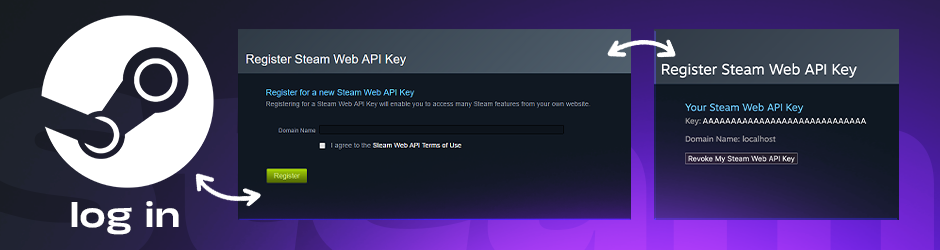
Remember that your safety is your own responsibility. While Steam offers a high level of security, it doesn’t guarantee a 100% safety against steam scams.
Log Into Your Steam Account
If you want to know how to get the Steam API key, the very first step is to open a browser. Find Steam in the search bar and log in to your account. Players cannot use the official app. The only way is through a browser.
Navigate to Steam Web API Registration Page
The next step is to find the API key on the Steam platform. The easiest way is to use the direct link that follows the Steam Web API Key page. Now, you need to enter your website’s domain in the “Domain Name” field, or simply use localhost.
Accept Terms and Generate Key
The final step is about how to generate the Steam API key. Since you already named your domain name, you need to accept the terms. As soon as you agree, Steam generates your key.
The API key on Steam contains 32 characters and digits. You need to keep it safe and paste it in the special field only on trustworthy platforms.
How to Revoke API Key Steam?
No less important is knowing how to revoke the API key Steam. The reasons could be different, such as suspecting it was compromised or simply stopping use of a service that requires it. That said, visit the same Steam page you used to create the API key. Here, you will see a button “Revoke My Steam Web API Key.” Click it, and the API key will be disabled immediately.
Players should regularly change their API keys as well. The recommended time period is at least every few months.
Common Problems When Getting Steam API Key
Of course, sometimes players run into issues when trying to get a Steam API key. Usually, you can fix it yourself within minutes. If our solutions don’t help, then it’s better to contact the Steam support team.
It’s good to remember that problems happen, and the best solution is not panic, but follow the basic recommendations.
Limited Account Error
As you know, before you spend at least $5 in the Steam market, players have a limited account. If you’re level 0, then the only way is to buy a game or Prime status to unlock all features instantly, along with the option to generate an API key.
Invalid Domain Name Error
This problem can happen if you try to use symbols or spaces. A simple alphanumeric string is the best solution, which always works.
API Key Not Showing
If you register the API key, but it’s not showing, check your Steam Mobile App. It includes checking the Steam Guard and the confirmations. If that doesn’t help, try clearing your cookies or changing your browser.
Best Practices for Keeping Your Steam Web API Key Safe
The final step of using the Steam Web API key is to keep it safe. Let’s check the best practices below.
As we mentioned, your API key is a bit like a password for your Steam account. In other words, treat it as the last line of defense for your data.
Never Share It Publicly
Since the API key can give scammers everything they need, it’s better not share it publicly. Enter it only on trustworthy platforms and services that have numerous positive reviews and a good reputation.
Avoid Suspicious CS2 Skin Sites
No less important is not to personally give your API key to suspicious sites. It’s similar to giving your house’s keys to thieves.
Regularly Check API Access
Lastly, players should monitor which services have access via Steam account settings. It’s also useful if you change your API key and know which services you need to update.
Wrapping Up!
As you can see, the Steam API key is essential if you want to unlock new trading features in CS2 or monitor stats in detail. By using our guide, you can easily get, revoke, and keep it safe. Also, if you are looking for a trusted and secure marketplace for buying and selling CS2 skins, then remember to visit ShadowPay. We offer safe API practices and a reliable trading infrastructure to all users. The years of experience with numerous positive reviews are the best proof of that.
Is it safe to give my Steam API key?
The Steam API key is a feature that works as a kind of a password to your account. In other words, if someone has access to your API key, they can manage your items, change account details, and even force you to pay bills.
How do I find my Steam key?
Players need to log into Steam in a browser, not the app. Then, they need to open the Steam Web API key page. It will be there if a key already exists. If it’s not, then players find a special button to create it. The same page allows users to reset or delete their key.
Can a Steam key expire?
Technically, it cannot expire, and players can use it as long as they need. Still, it’s better to change it regularly (at least every few months) for safety issues.


Share to: